What is an asset and how does it work?
Last updated: April 24, 2026
An asset is any digital asset in your organization that you want to monitor and protect on the platform: web applications, APIs, domains, or subdomains.
Once registered, Strike runs threat emulations automatically and on a recurring basis to detect vulnerabilities in real time, keeping security aligned with the pace of business changes.
💡 What's a threat emulation? It's an automated simulation of real-world attacks on an asset. Every result is validated by experts before being reported.
Assets overview
In the Assets section, you'll find key metrics to understand your security posture:
Assets with recurrent testing: assets with active continuous testing
With critical vulnerabilities: percentage of assets with critical vulnerabilities
Most vulnerable asset: the one with the highest exposure
New assets discovered: assets detected automatically
Assets overview
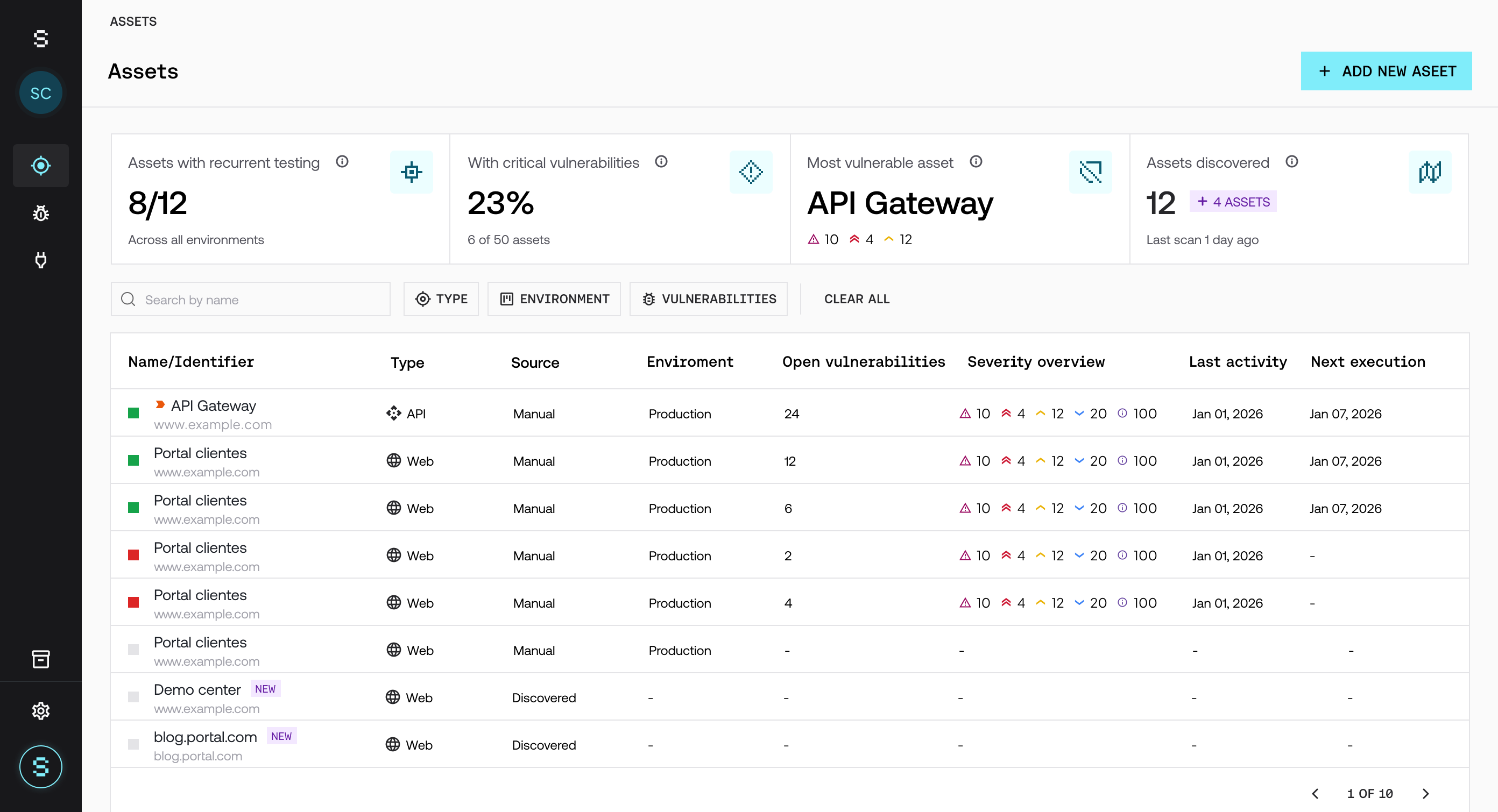
The main table lets you view and manage every asset:
Name and URL
Asset type
Source (manual or discovery)
Asset status (active with testing, inactive, pending setup)
Environment (development, staging, production)
Open vulnerabilities
Severity
Last activity
Next execution
💡 About discovered assets
Assets with a discovery source may show up as new on the platform.
👉 This means they were automatically identified by our Live Asset Radar and still need to be defined.
For these assets, you can:
Activate them for continuous testing
Keep them under monitoring
Ignore them if they're not relevant
👉 Activating them expands testing coverage and reduces blind spots across the attack surface.
This makes it easy to quickly prioritize where to focus security efforts and decide which assets should be tested.
Visual states make it easy to tell at a glance whether an asset is actively being tested, needs configuration, or isn't part of the current scope.
Assets FAQs
What is a "new" asset?
An asset in the "new" state is an asset automatically detected by Strike that hasn't been fully set up yet.
👉 This means it needs to be validated or configured before being included in testing.
What should I do with a "new" asset?
You can:
Complete its setup
Activate it to include it in continuous testing
Ignore it if it's not relevant
👉 Activating it expands coverage and reduces blind spots.
Can I hide or ignore discovered assets?
Yes. Discovered assets can be kept out of scope if they're not relevant to the business.
To do this, use the hide option right from the assets table: when you hover over a row, a button with a ⛔️ icon will appear, letting you hide that asset.
👉 This keeps only the relevant assets visible and cuts noise out of your management view.
What does the asset status mean?
The status shows whether an asset is being tested and under what conditions:
Active (recurrence on): continuous testing is active
Active (recurrence off): asset is active but without recurring testing (recurrence was manually turned off by the user)
Inactive: not being tested
New: needs setup
How do I activate a discovered asset?
To activate an asset:
Review the detected asset
Complete its setup
Include it in the testing scope