How to run a Focused Test on an asset
Last updated: July 7, 2026
Focused Tests let you run a one-time validation on an asset, focused on a goal you define yourself (an endpoint, a specific test, an admin panel, etc.). They coexist with continuous threat emulations without altering them, and use the same engine with a narrower scope and a model optimized for targeted validations.
⚠ Availability: Focused Tests is an add-on. To have it available, you need to purchase a testing units bundle (also called one-off executions), which is the same bundle used for Change-Based Tests. If you don't have the add-on, you won't see the Focused Tests button on the asset overview. To enable it, contact your Customer Success Manager.
What Focused Tests are
Until now, security validation on an asset in Strike worked through threat emulations: continuous, automatic, and recurrent executions that draw from the asset context.
There are moments, however, when you need something different: a specific, targeted validation focused on a particular flow or area of the asset. For example: validating a new login endpoint, reviewing the checkout flow, or trying a specific type of test on your asset.
For those cases, we created Focused Tests: a new type of execution within the asset, on-demand, one-shot, and guided by a goal you define in free text.
On-demand: triggered when you decide, outside the recurrent cycle.
One-time: runs once, it isn't recurrent.
Goal-scoped: limited to a specific and bounded area of interest.
Independent: doesn't affect or pause ongoing threat emulations.
How it works
When you create a Focused Test, the AI Pentester receives the asset configuration along with the goal you defined. Unlike a threat emulation, which runs a complete and deep analysis over the full scope of the asset, a Focused Test works on a scope narrowed to the area indicated in the goal, using a model optimized for that kind of targeted validation.
This means a faster execution focused exclusively on what you want to validate.
In addition, when creating the Focused Test you can adjust files, restrictions, and credentials just for that execution, without touching the asset's base configuration. This lets you, for example, validate with temporary credentials, add specific restrictions, or upload files specific to that test.
ℹ A Focused Test does not modify the asset context, the asset configuration, or the findings of the continuous cycle. Any adjustment applies only to that execution. Its results are stored and displayed separately, visually identified with a Focused tag.
Focused Tests vs. threat emulations
Both types of execution use the same AI agent and the same asset configuration (credentials, restrictions, etc.), but they're optimized for different purposes. Threat emulations run a complete and deep analysis of the asset continuously, while Focused Tests run validations narrowed to a specific goal.
Attribute | Threat emulations | Focused Tests |
|---|---|---|
Trigger | Automatic | On-demand |
Frequency | Recurrent, continuous | Single execution |
Scope | Driven by asset context | Defined by a specific goal |
Depth | Complete and deep analysis | Targeted, optimized validation |
Purpose | Continuous validation | One-off, intentional validation |
Engine | AI Pentester | AI Pentester |
Asset configuration | Same | Can vary (credentials, restrictions, etc.) |
Consumption bundle | Base recurrence plan | Testing units bundle (shared with Change-Based Tests) |
When to use each one
Threat emulations are your continuous validation layer: keep them active to maintain permanent visibility over the asset's risk.
Focused Tests are your targeted validation tool: use them when you want to test something specific, now, without waiting for the next cycle.
It's not one or the other. Focused Tests complement recurrent threat emulations, they don't replace them. The ideal setup is to have both active: complete periodic coverage plus one-off validations at the moments where they add the most value.
How to create and run a Focused Test
Before you start
Have the add-on contracted and testing units available in your account.
Have an Owner or Operator role in the Strike organization.
Have the asset configured with its base credentials and restrictions (optional, you can override them in the form).
Step 1: Go to the asset detail
From the assets list, select the asset you want to run the validation on. Inside the asset, in the threat emulations list, you'll see a new button + Run Focused Test.
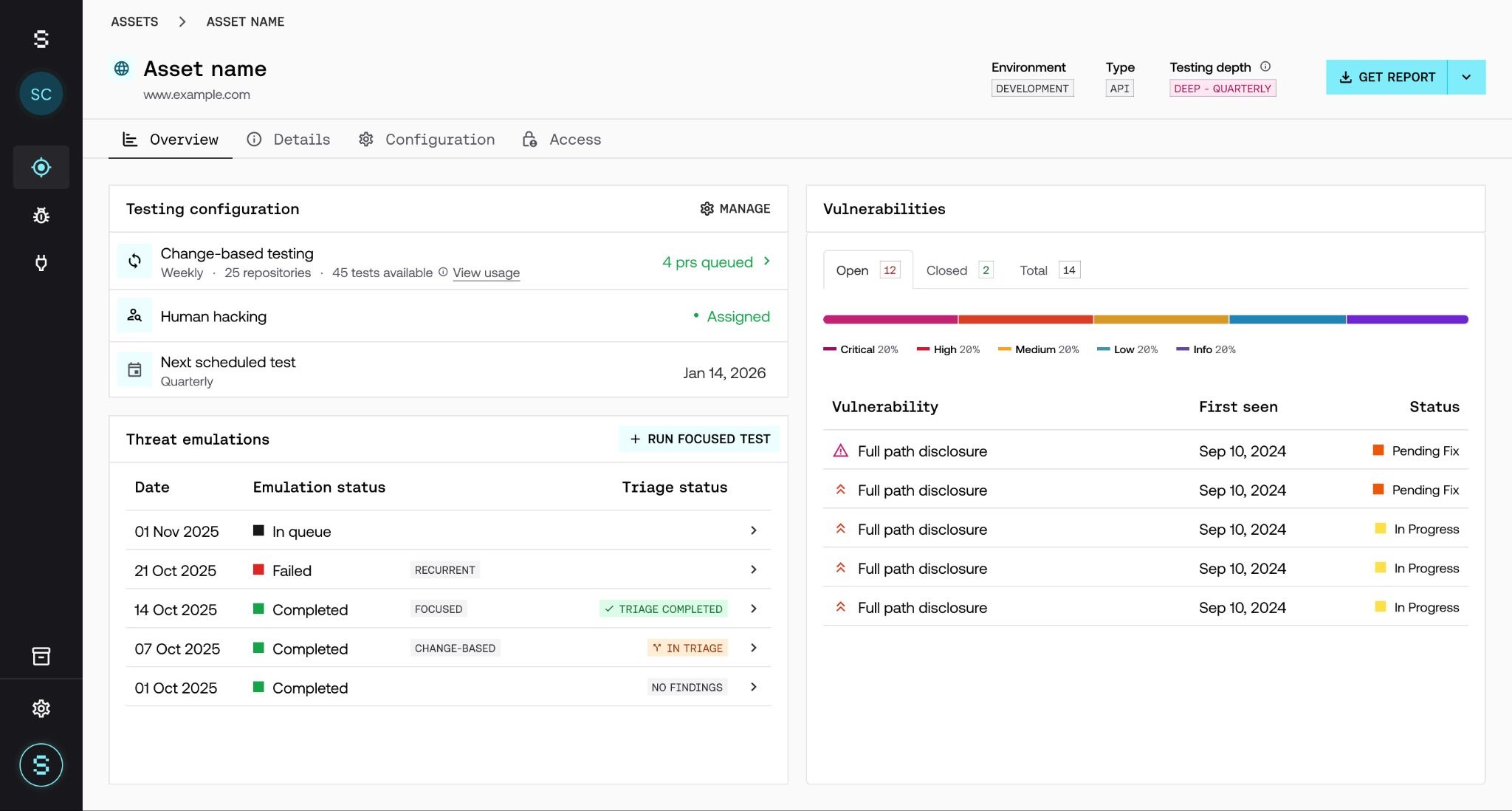
Step 2: Create a new Focused Test
Click + New Focused Test. A modal opens with two steps. In the first one, you need to fill in:
Goal / Focus description: free text describing the goal or area you want to prioritize (for example: "Test the login flow with MFA enabled, focus on token validation and session handling").
Documentation: where to attach any documentation that may help with the test. Here you can choose to include the documentation already loaded on the asset or add new documentation.
Optional fields (overrides):
By default, the Focused Test pre-loads the asset configuration as is. If you need something different just for this execution, you can adjust:
Files: upload specific files to use during the validation.
Restrictions: define additional restrictions or replace the asset's.
Credentials: use credentials different from those configured on the asset (useful to validate with a specific user, a temporary account, etc.).
Any value you adjust in these fields applies only to the Focused Test you're creating: the asset's general configuration stays intact.
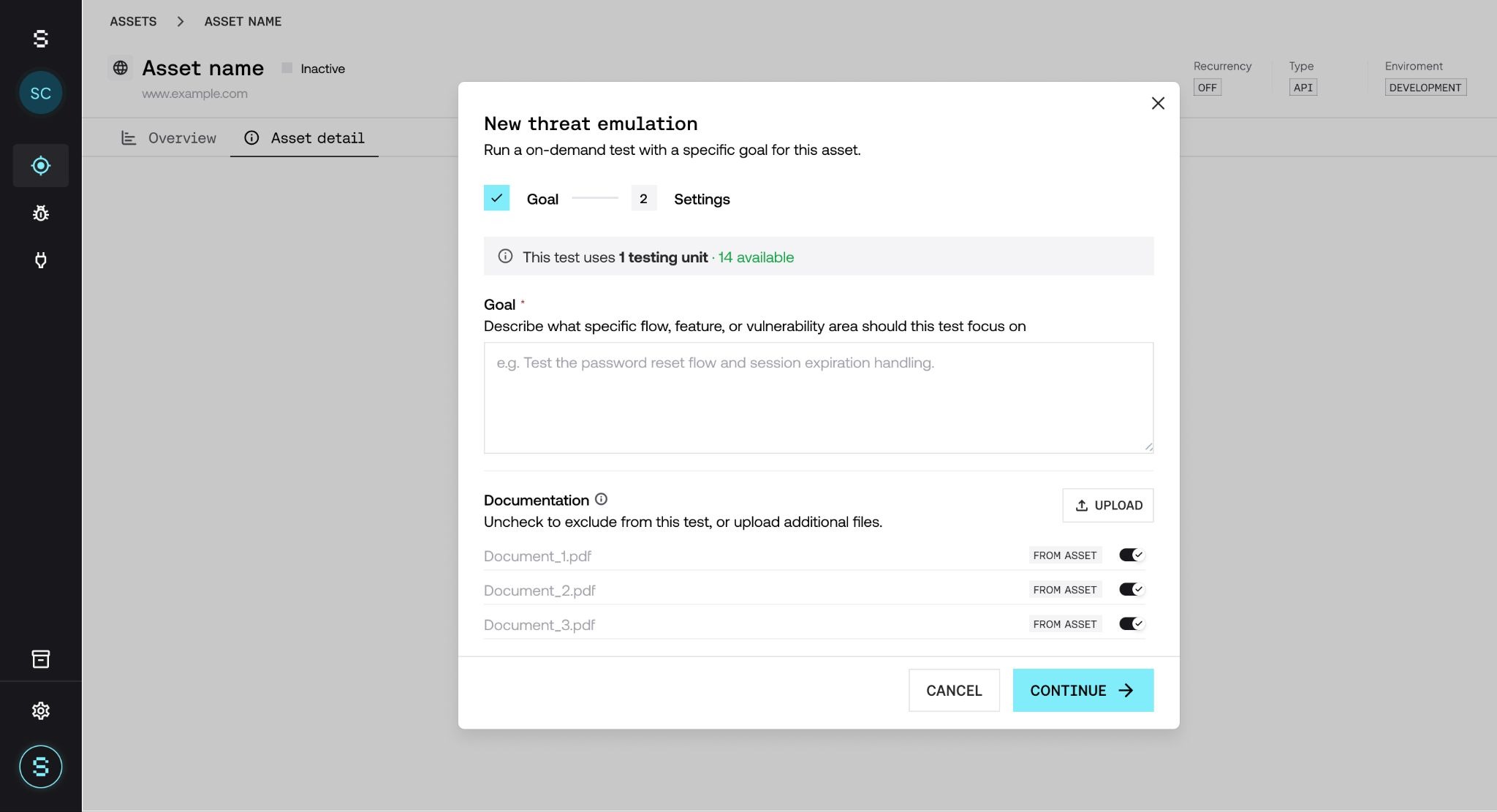
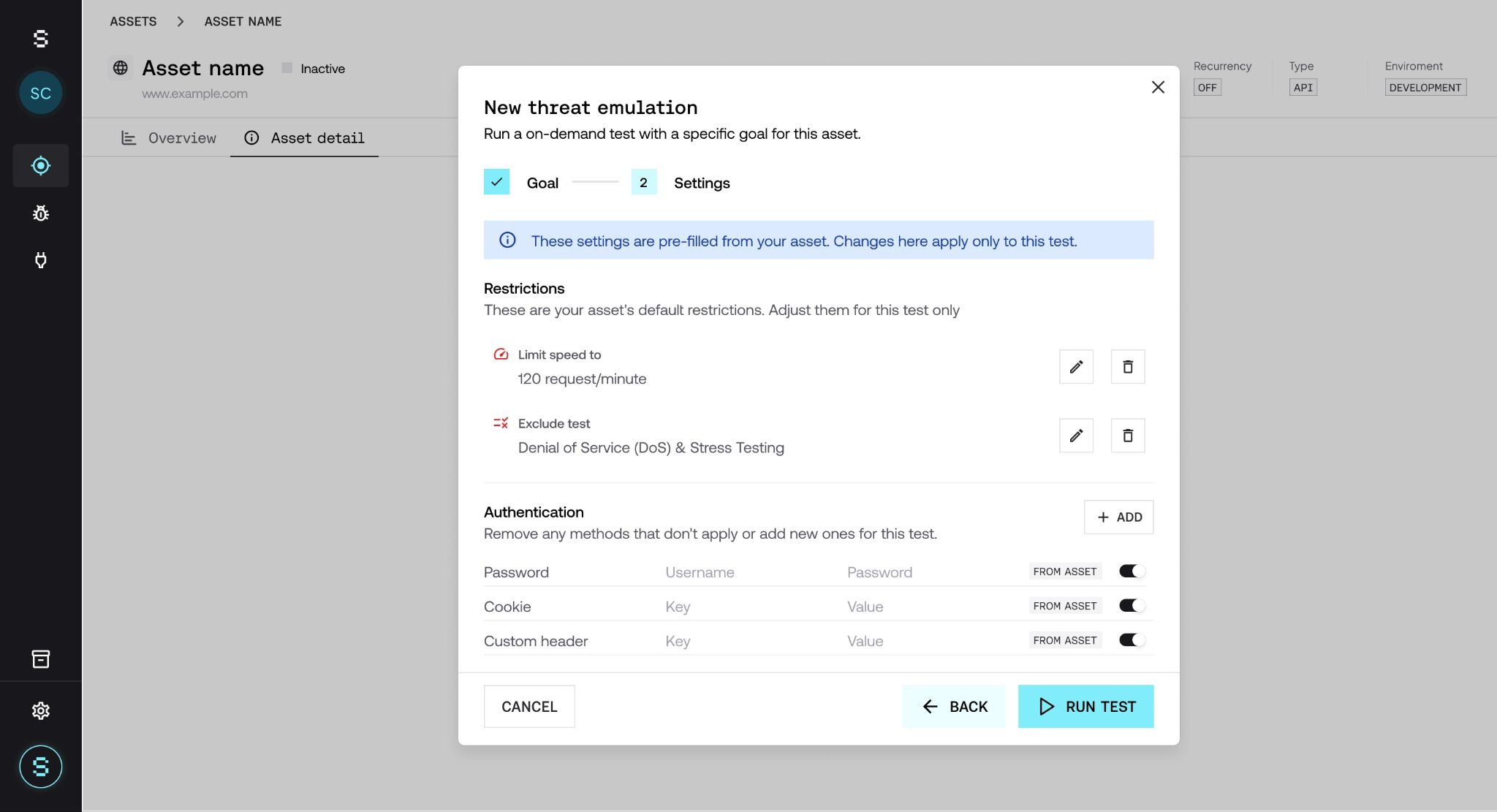
Step 3: Trigger the execution
To run it, click Run Test. The execution starts immediately, and you'll be able to track its status in real time like any other execution. The execution consumes 1 testing unit from your bundle.
Step 4: Review the results
When the execution finishes, you can access the detail by clicking on its name. The detail view shows:
Execution summary (duration, scope, applied goal).
Findings (vulnerabilities, evidence, and severity).
Traces and steps followed by the AI Pentester during the focused exploration.
Step 5: See the impact on the asset
Focused Test executions are also reflected in the asset overview, visually differentiated from threat emulations with a Focused tag. This lets you identify at a glance which information comes from continuous validation and which comes from targeted validations.
Plan and consumption
Focused Tests is an add-on. It's not included in the base plan and requires specific contracting to be available in your account.
How it's billed
Consumption is measured in testing units (also called one-off executions). Every time you trigger a Focused Test, one testing unit is deducted from the contracted bundle.
The testing units bundle is shared: the same pool is used for Focused Tests and for Change-Based Tests. This gives you flexibility to distribute your one-off executions between the two features as needs arise, without having to decide in advance how many you'll use of each type.
How they differ from recurrent executions
Focused Tests are designed as a complementary tool to threat emulations, optimized for one-off, narrowed validations. The key differences:
Control over the trigger: you decide when it runs, based on when you need to validate (a specific type of test, a stakeholder request, etc.).
Narrowed, specific scope: by defining a goal, the AI Pentester focuses on a specific area of the asset instead of running a complete analysis. This allows the use of a lighter, more efficient model while keeping quality on the prioritized area.
Lower cost per execution: thanks to that narrowed scope, a testing unit costs less than a complete recurrent execution, letting you do one-off validations without impacting your budget.
Together, they let you complement the broad, deep coverage of recurrent threat emulations with focused, frequent, on-demand analyses at the points where they add the most value.
Frequently asked questions
Does a Focused Test interrupt or modify ongoing threat emulations?
No. Threat emulations continue operating without changes. Focused Tests run in parallel and are completely independent of the recurrent cycle.
Can I schedule a Focused Test to repeat?
No. By design, Focused Tests are one-shot executions. If you need continuous validation over an area, that's already covered by threat emulations.
Can I edit a Focused Test after creating it?
As long as it hasn't been executed, you can edit everything. Once executed, the run and its goal become immutable as a historical record.
How many Focused Tests can I have per asset?
There's no strict limit at the creation level. The general limits of one-off executions in your plan do apply; check with your Customer Success Manager if you have any questions.
Can I launch multiple Focused Tests in parallel on the same asset?
Yes, to the extent your plan allows. Each Focused Test keeps its own scope and results.
What happens if the goal is poorly written or ambiguous?
The AI Pentester will interpret it as best as possible and prioritize the area it understands as the goal. If the goal is very ambiguous, the results may not be as focused as you expect. We recommend describing the goal as clearly as possible, indicating the flow, endpoint, or area you want to validate.
How are Focused Test executions consumed?
Each Focused Test consumes one execution from the one-off executions bundle associated with your account. This bundle is shared with Change-Based Tests, so consumption is deducted from the same pool. You can see the available balance from the Plan & Usage page of your organization.
What happens if I run out of one-off executions?
You won't be able to launch new Focused Tests or Change-Based Tests until you renew or expand the bundle. Continuous threat emulations are not affected. To add more executions, contact your Customer Success Manager.
Can I use credentials different from the asset's in a Focused Test?
Yes. By default, the Focused Test uses the asset configuration (credentials, restrictions, files), but you can override any of these three fields when creating the execution. Overrides apply only to that Focused Test and don't modify the asset configuration.