How to pause a Threat Emulation or cancel an execution
Last updated: October 14, 2026
A Threat Emulation groups one or more assets and runs according to the recurrence you configured. Each time it runs, an execution is generated.
That is why there are two different actions to stop testing:
Pause the Threat Emulation | Cancel an execution | |
|---|---|---|
What it acts on | The entire Threat Emulation | An execution that is in progress |
What happens next | It does not run again until you resume it | The Threat Emulation continues with its recurrence and the next execution runs on the scheduled date |
Credits | No credits are consumed while it is paused | Credits for the canceled execution are still consumed |
Reversible | Yes, you can resume it whenever you want | No, a canceled execution cannot be resumed |
Both actions are in the three-dot menu, in the upper right corner of the Threat Emulation. The options enabled in that menu depend on the status of the Threat Emulation: for example, Resume is only available if it is paused, and Cancel execution only while an execution is in progress.
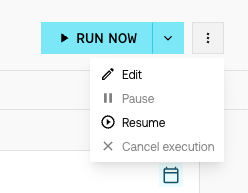
Pause a Threat Emulation
Pausing stops the entire Threat Emulation until you decide to resume it. It is useful if you need to halt testing for a period of time.
Go to Threat Emulations and open the Threat Emulation you want to pause.
Click the three-dot menu in the upper right corner and select Pause.
Confirm the action.
To resume it, open the Threat Emulation, click the three-dot menu and select Resume.
If the date of the next execution passes while the Threat Emulation is paused, that execution runs as soon as you resume it.

Cancel an execution
Canceling permanently stops an execution that is in progress. Use it in a critical scenario, for example an incident in your environment.
Go to the Threat Emulation that has the execution in progress.
Click the three-dot menu in the upper right corner and select Cancel execution.
Confirm the action.
The execution stops and is not resumed. The Threat Emulation remains active: the next execution runs on the scheduled date according to its recurrence. If you also want to prevent upcoming executions, pause the Threat Emulation.
Credits for a canceled execution are still consumed. For more details, see Credits: what they are and how they are consumed.
Automatic pause due to lack of credits
If your plan runs out of credits, the Threat Emulation is paused automatically and the platform displays a message. To resume it, contact your Customer Success Manager to add credits to your plan.
Frequently asked questions
Is pausing a Threat Emulation the same as canceling an execution?
No. Pausing stops the entire Threat Emulation until you resume it. Canceling stops a specific execution that is in progress, and the Threat Emulation continues with its recurrence.
Why can't I select Pause or Cancel execution?
The menu options depend on the status of the Threat Emulation. Pause is not available if the Threat Emulation is already paused; in that case you can select Resume. Cancel execution is only enabled while an execution is in progress.
If I cancel an execution, do I get the credits back?
No. Credits for a canceled execution are still consumed.
Can I resume an execution I canceled?
No. Cancellation is final. The Threat Emulation runs again on the next scheduled date.
Can I delete a Threat Emulation?
No, not if it has already had at least one execution. If you do not want it to keep running, you can pause it.